The hot key problem: when one Redis key takes down your cluster
TL;DR
- A hot key is a single cache key that gets far more traffic than the rest, for example a viral post. In Redis Cluster every key lives in one hash slot on one shard, so all of its traffic hits one node.
- Adding nodes doesn't help: new shards get other keys, never a share of one key's traffic.
- The interview answer: find the hot key, cache it in each app server's memory for a second or two, spread copies across shards, collapse duplicate requests when it expires, and plan ahead for known spikes.
"One cache key gets millions of reads per second, and one Redis node is at 100% CPU. How do you fix it?" It's a favourite backend and system design interview question, because the obvious answer, "add more nodes", is wrong.
This post explains why, then walks through the 5-step answer.
Try the free Interview Question Predictor
Paste a job description, get the 10 questions you're most likely to be asked, with answer tips. No sign-up.
Why adding nodes doesn't help
Redis Cluster splits the key space into 16,384 hash slots. Every key maps to exactly one slot, and every slot is served by one master. So a key like post:42 always lives on one shard.
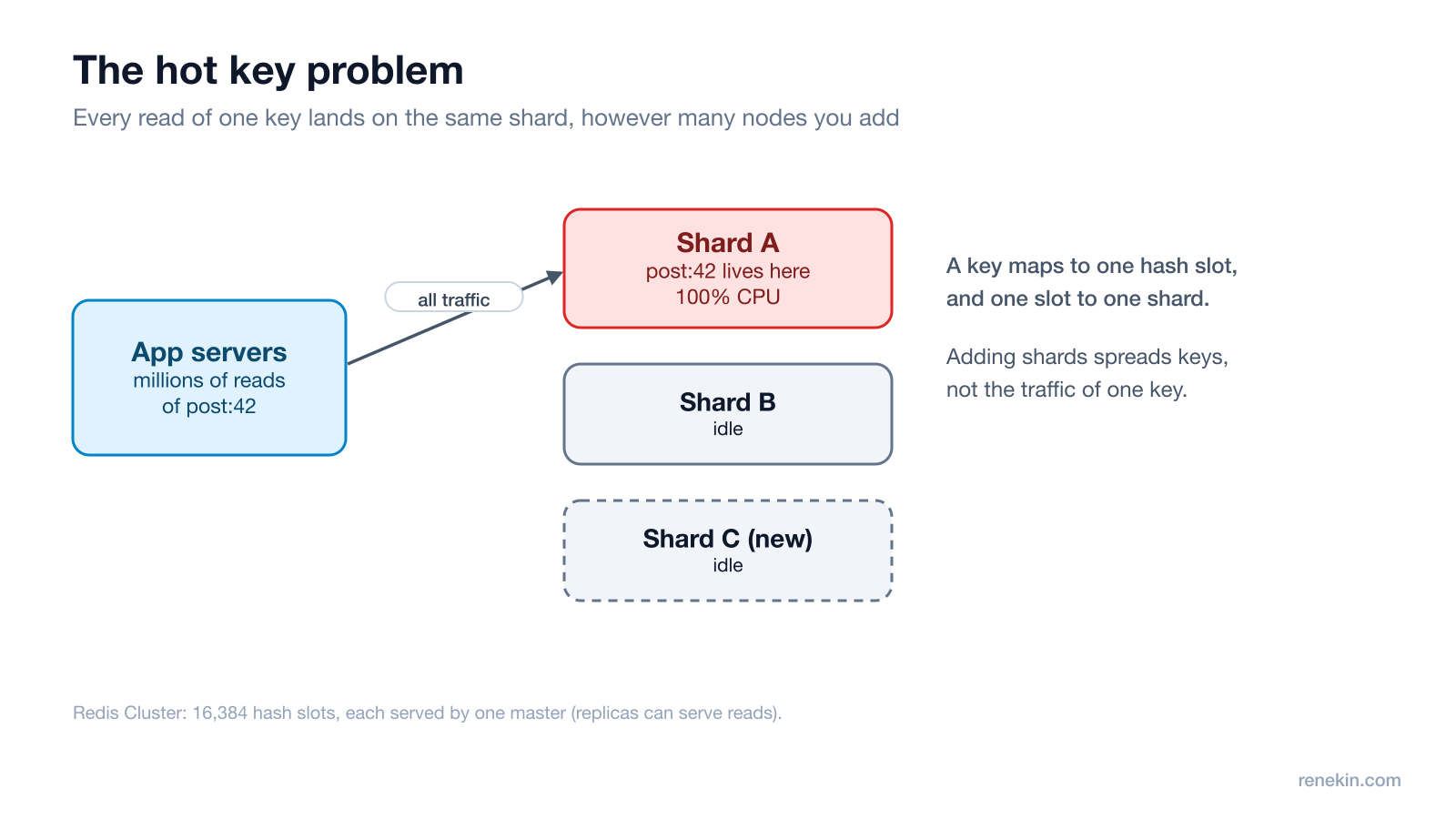
Add a new shard and it takes over some other slots. The hot key doesn't move, and even if it did, its traffic would simply melt the new node instead. Consistent hashing has the same limit: it spreads keys, not traffic (see consistent hashing explained).
The answer in 5 steps
1. Find the hot key
You can't fix what you can't see.
redis-cli --hotkeysscans the keyspace for the most-used keys. It only works whenmaxmemory-policyis an LFU policy (allkeys-lfuorvolatile-lfu), its counts are approximate, and the scan itself adds load.- Counting reads per key in your client library or proxy is often cheaper and more precise. Sample a small share of requests and alert when one key's share jumps.
2. Cache it in app memory
Keep a copy of the hot value in each app server's own memory, with a very short TTL, such as one or two seconds. If you run 50 app servers, Redis now sees at most about 50 reads of that key per TTL window instead of millions.
- The cost is staleness: users may see a value up to a second or two old. For a like count or a product page, that's fine. For a bank balance, it isn't.
- Redis also supports server-assisted client-side caching ("tracking"), where Redis tells clients when a cached key changes, so local copies can live longer.
3. Copy it across shards
Store several copies of the key under different names, such as post:42:1 to post:42:8. Different names hash to different slots, so the copies land on different shards. Each read picks a random copy.
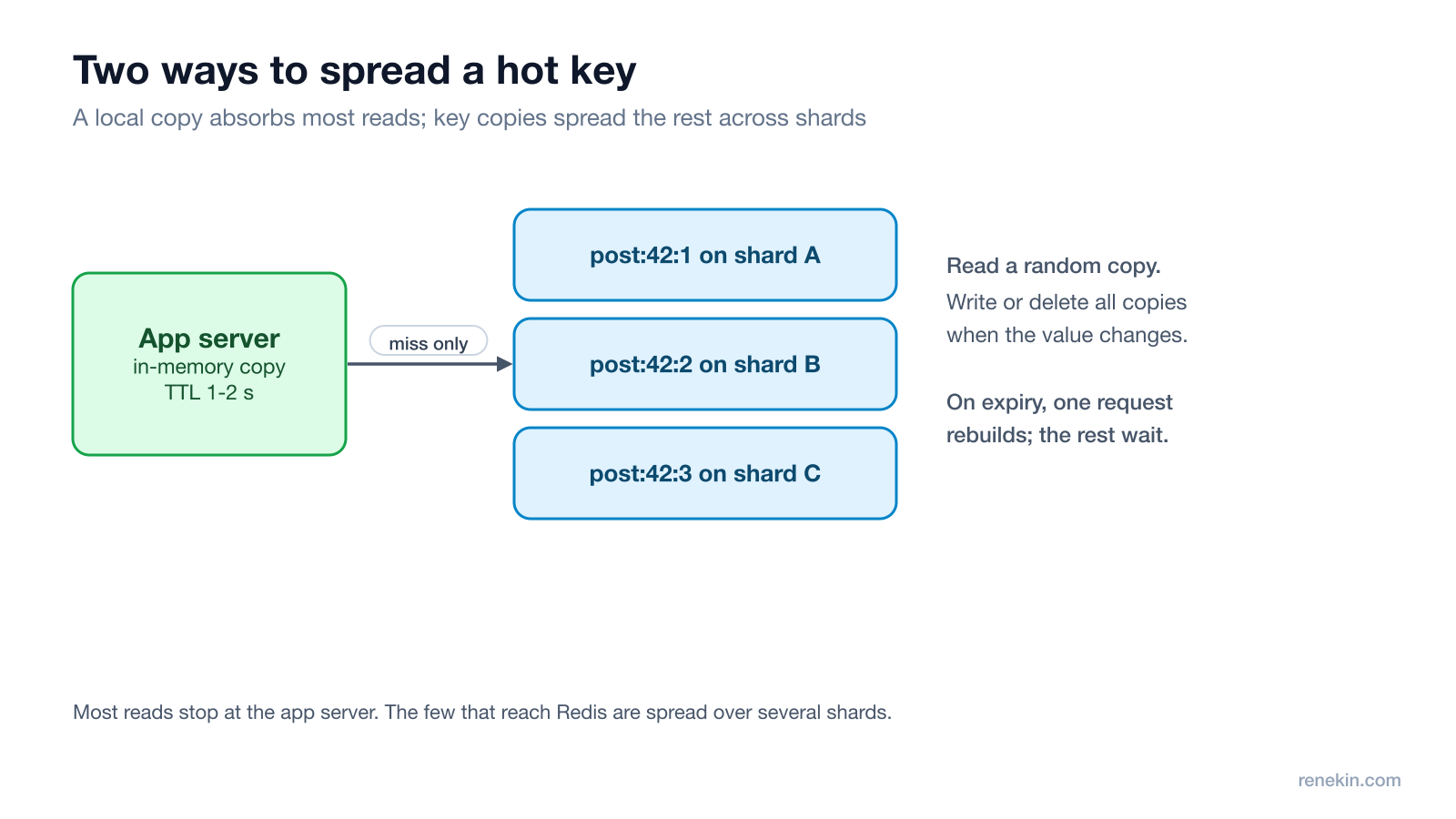
- Writes now have to update or delete every copy, so this works best for keys that are read far more than written.
- Don't use a hash tag like
{post:42}:1here: hash tags exist to force keys into the same slot, which is the opposite of what you want. - Read replicas are another option: replicas can serve reads, so a slot's read load can be spread over its master and replicas.
4. Collapse duplicate requests
When a hot key expires, thousands of requests miss at the same moment and all hit the database. That's a cache stampede. Fix it with request coalescing: the first request takes a short lock and rebuilds the value, and the rest wait for its result or serve the old value briefly. Adding random jitter to TTLs also stops many keys expiring together. (More in caching strategies for system design.)
5. Plan for the next spike
- Alert on traffic per key, not just per node, so you see a hot key before the node falls over.
- Some spikes are predictable: a product launch, a sale, a live match. Pre-split and pre-warm those keys before the event.
- Decide what happens if the cache node does fall over: the app should still work, more slowly, and the database must be protected by rate limits.
The one-line answer
"Adding nodes won't help, because one key lives on one shard. I'd find the hot key, cache it in each app server's memory for a second or two, spread copies across shards, coalesce duplicate misses so the database isn't stampeded, and alert on per-key traffic."
Follow-up questions to expect
- "What about hot writes, like a like counter?" Split the counter into several sub-keys, increment a random one, and sum them on read, or buffer increments in memory and flush them in batches.
- "How stale can the local cache be?" Tie it to the product: a second is fine for a view count, not for inventory or payments.
- "How is this different from a big key?" A big key is a single huge value (a giant list or hash). A hot key is a normal value that gets too much traffic. They need different fixes.
For more system design breakdowns, see rate limiter system design and how to scale a database.
Frequently asked questions
What is a hot key in Redis?
A hot key is one key that receives a disproportionate share of reads or writes, such as a viral post, a flash-sale product or a live match score. Because each key lives on one shard, the shard holding it can hit 100% CPU while the others stay idle.
Why doesn't adding more Redis nodes fix a hot key?
Redis Cluster maps every key to one of 16,384 hash slots, and each slot is served by one master. New nodes take over other slots, so the hot key's traffic still lands on a single node. Replicas can help with reads, but only up to the number of replicas you have.
How do you find hot keys in Redis?
Run redis-cli --hotkeys, which needs an LFU maxmemory-policy (allkeys-lfu or volatile-lfu) and gives approximate counts, or count reads per key in your client or proxy. Client-side counting is usually cheaper and more precise.
What is request coalescing?
Request coalescing (also called single flight) means that when many requests miss the cache for the same key at once, only one of them rebuilds the value from the database and the rest wait for that result. It prevents a cache stampede when a hot key expires.
Try Ghost free
20 free credits, every feature unlocked, hidden from screen share. No card, no subscription.
Download Ghost