Kafka vs RabbitMQ vs SQS: how to choose a message queue in an interview
TL;DR
- Kafka is a durable log: messages stay after they're read, many consumer groups read at their own pace, and you can replay.
- RabbitMQ and SQS are work queues: a message goes to one consumer and disappears once it's acknowledged.
- All three are usually at-least-once, so consumers must be idempotent. Pick SQS when you want a managed queue with no operations work.
Kafka, RabbitMQ and Amazon SQS all move messages between services, but they're built on different ideas. Kafka is a log that many readers can read and re-read. RabbitMQ and SQS are queues that hand each job to one worker and then forget it. Interviewers ask "why this one?" to see if you know that difference.
Try the free Interview Question Predictor
Paste a job description, get the 10 questions you're most likely to be asked, with answer tips. No sign-up.
Step 1: Start from the use case
Before naming a tool, ask what the messages are for:
- Jobs to do once: send an email, resize an image, charge a card. You want each message handled by exactly one worker.
- Events many systems care about: "order placed" might feed billing, search, analytics and email. Each needs its own copy, at its own pace.
- Do you need history? Replaying last week's events to rebuild a service or fix a bug points strongly to a log.
Step 2: Explain the log model (Kafka)
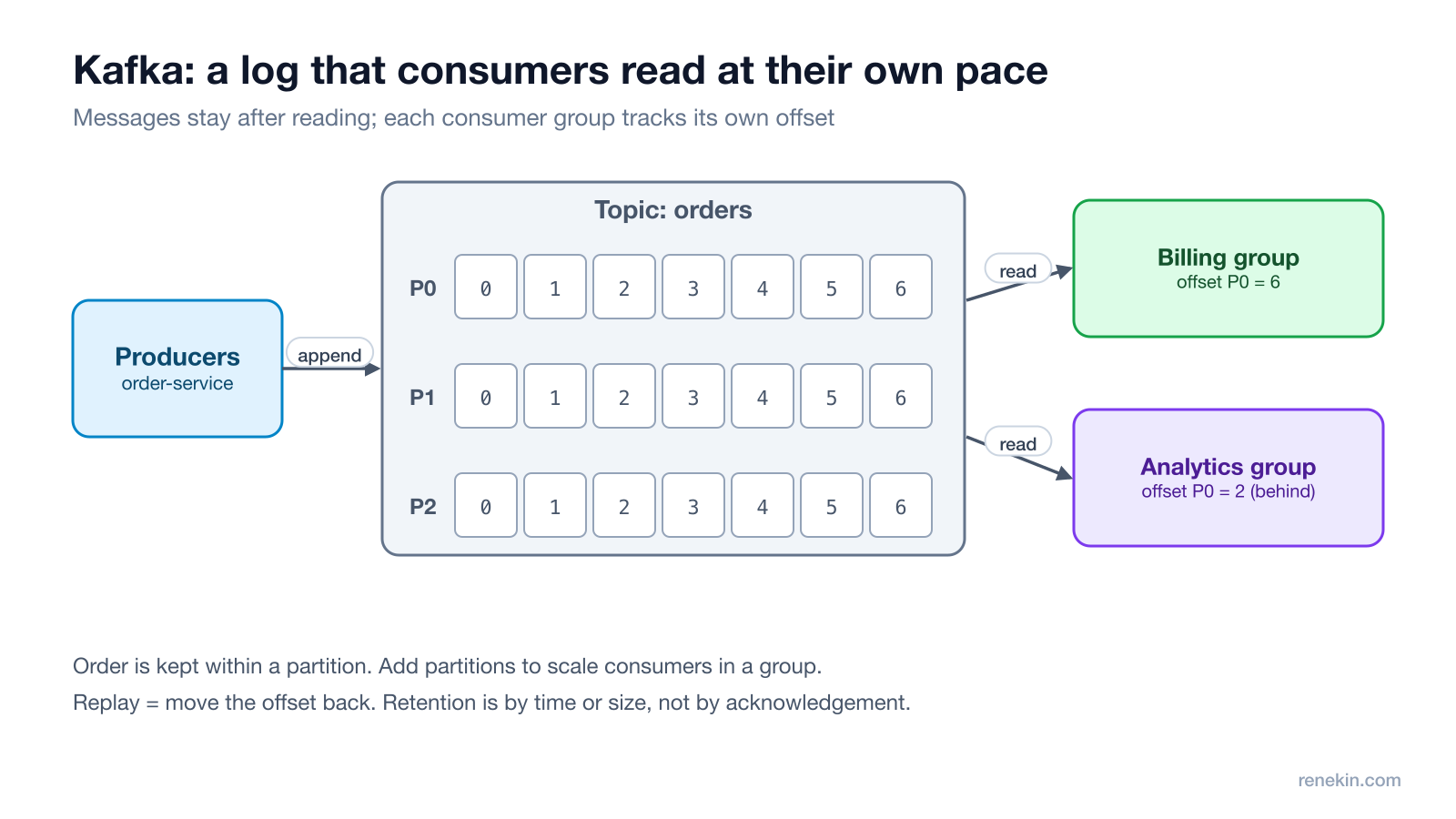
- A topic is split into partitions. Each partition is an append-only log, and every message has a position called an offset.
- Consumers belong to consumer groups. Each group reads every message once and remembers its own offset, so billing and analytics read the same events independently.
- Messages are kept for a set time or size, not deleted when read. To replay, you move a group's offset back.
- Order is kept within a partition. Use a key like the order ID so all events for one order land in the same partition.
See the Kafka documentation for the full design.
Step 3: Explain the queue model (RabbitMQ and SQS)
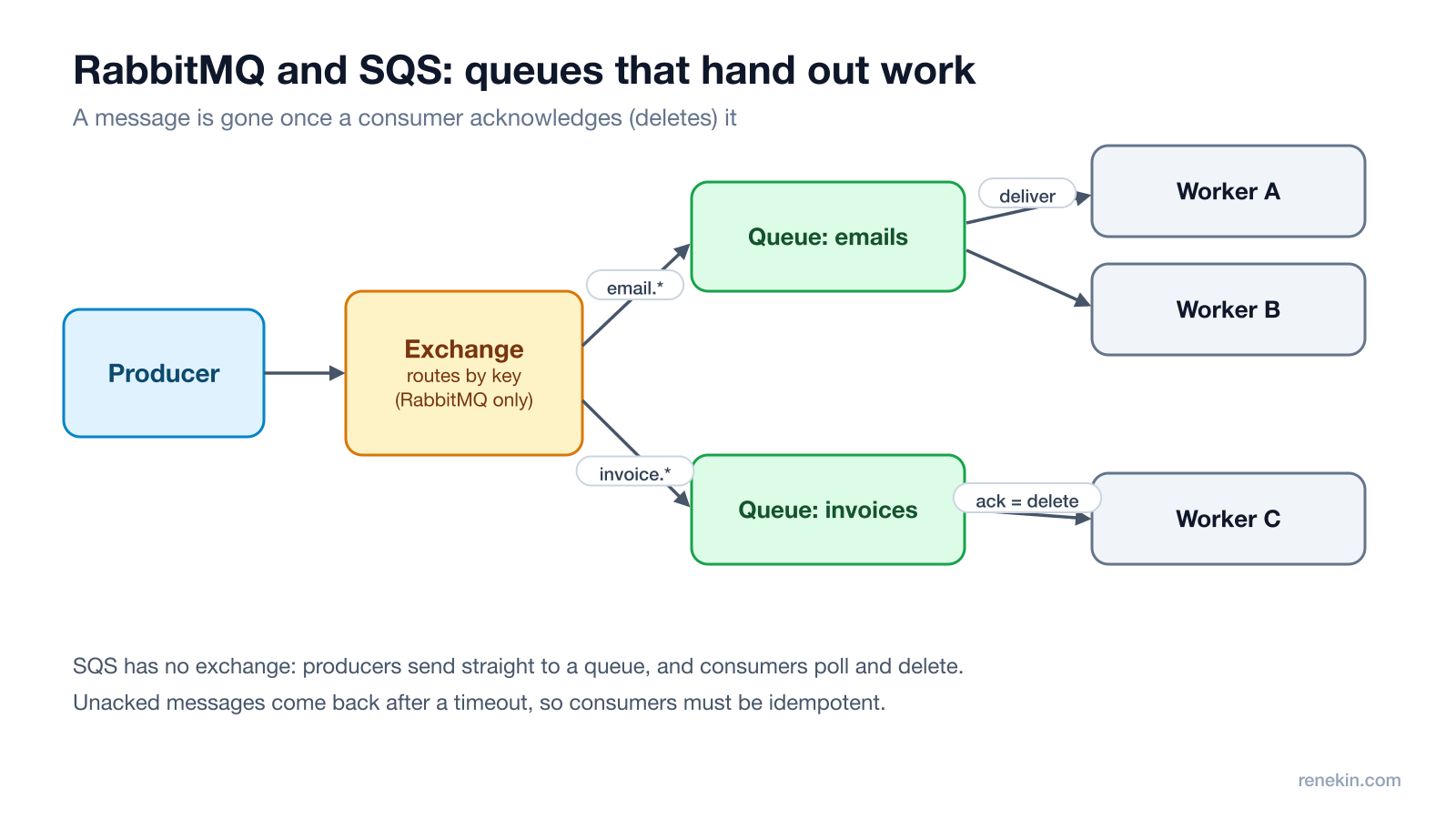
- RabbitMQ: producers publish to an exchange, which routes messages to queues by rules such as a routing key. Consumers receive messages and acknowledge them; unacknowledged messages are redelivered. It's great for flexible routing, priorities and per-message work.
- SQS: a fully managed queue on AWS. Producers send straight to a queue; consumers poll, process and delete. If a consumer doesn't delete a message within the visibility timeout, it becomes visible again and another consumer gets it (AWS: visibility timeout).
Step 4: Compare them side by side
| Kafka | RabbitMQ | SQS | |
|---|---|---|---|
| Model | Durable log | Broker with queues | Managed queue |
| After a message is read | Kept until retention ends | Removed on ack | Removed on delete |
| Many independent consumers | Yes, consumer groups | Needs a queue per consumer | Needs a queue per consumer (often via SNS) |
| Replay | Yes, move the offset | No | No |
| Ordering | Per partition | Per queue, with one consumer | FIFO queues only |
| Operations | Heaviest to run yourself | Moderate | None, fully managed |
Step 5: Talk about delivery guarantees
All three are typically at-least-once: a worker can crash after doing the work but before acknowledging, so the message comes back. That means:
- Make consumers idempotent, for example by recording processed message IDs or using idempotency keys, so a duplicate does nothing.
- Use a dead-letter queue for messages that keep failing, so one bad message doesn't block the rest.
- Be careful claiming "exactly once". Kafka offers exactly-once semantics within Kafka using transactions, but side effects outside Kafka, like sending an email, still need idempotency.
The one-line answer
"For one-off jobs like emails I'd use a work queue, SQS if we're on AWS and want zero operations. For events that several services consume independently, or that we may need to replay, I'd use Kafka, keyed by entity ID for ordering. Either way, consumers are idempotent with a dead-letter queue."
Follow-up questions to expect
- "How do you scale Kafka consumers?" Add consumers to the group, up to the number of partitions. More consumers than partitions sit idle.
- "What if a consumer is slow?" Watch consumer lag, add partitions and consumers, or move slow work to its own topic.
- "How do you keep the database and the queue in sync?" Use the outbox pattern: write the event to an outbox table in the same transaction, and publish from there.
Related breakdowns: idempotency keys explained and the saga pattern for distributed transactions.
Frequently asked questions
What is the main difference between Kafka and RabbitMQ?
Kafka stores messages in a durable, ordered log that consumers read by tracking an offset, so messages stay after reading and can be replayed by many independent consumers. RabbitMQ delivers each message from a queue to a consumer and removes it once acknowledged, with flexible routing through exchanges.
When should you use SQS instead of Kafka?
Use SQS when you need a simple, fully managed work queue on AWS, such as sending emails or processing uploads, and don't need replay, long retention or many independent consumers of the same stream.
Does Kafka guarantee message order?
Kafka guarantees order within a partition, not across a whole topic. Messages with the same key, such as the same order ID, go to the same partition, so their order is kept.
What does at-least-once delivery mean?
It means a message will be delivered, but it may be delivered more than once, for example if a consumer crashes after processing but before acknowledging. Consumers must be idempotent so a duplicate does no harm.
Try Ghost free
20 free credits, every feature unlocked, hidden from screen share. No card, no subscription.
Download Ghost