LLM tool calling: how to design an agent's tools (AI engineer interview)
TL;DR
- The model never runs anything. It returns a structured request to call a tool, and your code decides whether and how to run it.
- Good tools are few, narrow and clearly described, with strict argument schemas and helpful error messages.
- Put safety in code, not the prompt: validate arguments, check the user's permissions, confirm risky actions and cap the number of steps.
Tool calling (or function calling) lets a language model use your systems: look up an order, search documents, issue a refund. The key idea interviewers want to hear is that the model doesn't run anything. It asks, and your code decides.
A typical question: "Design the tools for a customer support agent that can look up orders and issue refunds."
Try the free Interview Question Predictor
Paste a job description, get the 10 questions you're most likely to be asked, with answer tips. No sign-up.
Step 1: Explain the loop
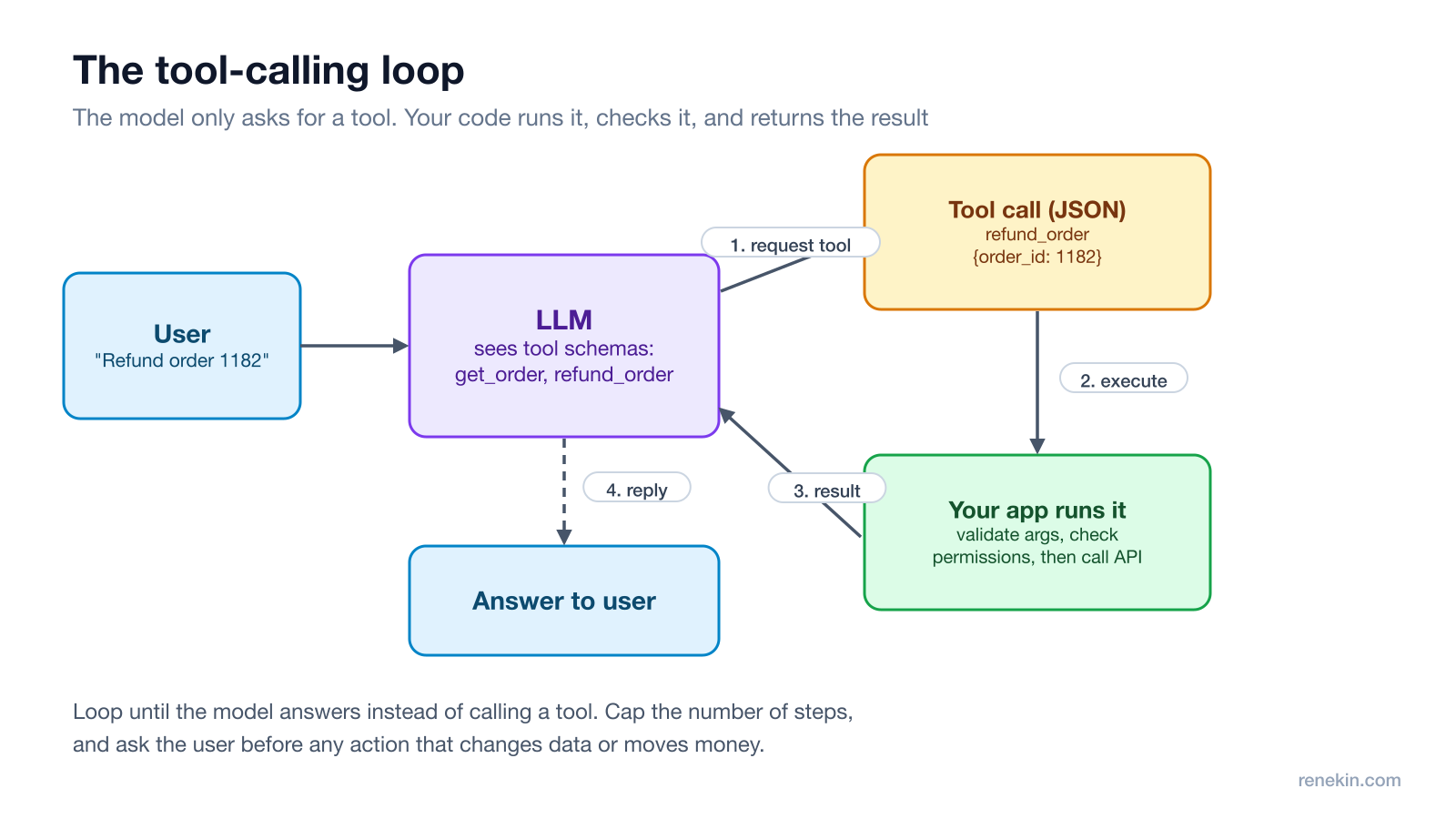
- You send the user's message plus a list of tool definitions: name, description and a JSON schema for the arguments.
- The model either answers, or returns a tool call such as
refund_order({"order_id": 1182}). - Your application validates and runs it, then sends the result back.
- The model continues, calling more tools or giving the final answer.
Both major providers document this same loop (Anthropic: tool use, OpenAI: function calling).
Step 2: Design a small set of clear tools
For the support agent:
| Tool | Arguments | Notes |
|---|---|---|
get_order |
order_id |
Read-only, safe to call freely |
search_orders |
email, date_range |
Read-only, returns at most 10 results |
refund_order |
order_id, amount, reason |
Changes money, needs confirmation |
escalate_to_human |
summary |
Always available as a way out |
Principles to say out loud:
- Few and distinct. Overlapping tools like
find_orderandlookup_orderconfuse the model. - Descriptions are prompts. Say when to use the tool and when not to: "Use only after confirming the order belongs to the signed-in customer."
- Strict schemas. Use enums for fixed choices like refund reasons, and required fields. Reject anything that doesn't match.
- Small, useful outputs. Return the fields the model needs, not a 5,000-line JSON blob that fills the context.
Step 3: Put safety in code, not the prompt
A prompt saying "never refund more than the order total" is a hope. Enforce it:
- Permissions: run every tool as the signed-in user. The agent can only see that customer's orders, whatever the model asks for.
- Validation: check the refund amount against the refundable total on the server.
- Confirmation: for actions that change data or move money, show the user what will happen and wait for a yes.
- Limits: cap steps per conversation, for example 10 tool calls, and refunds per day.
This also defends against prompt injection, where text in an email or document tries to make the agent call tools it shouldn't. We cover that in prompt injection in AI agents.
Step 4: Handle errors and loops
- Return specific errors the model can act on: "amount exceeds refundable total of $49".
- Make tools idempotent where possible, so a retried
refund_orderdoesn't refund twice. Pass an idempotency key to the payment API. - Detect loops: if the model calls the same tool with the same arguments repeatedly, stop and escalate.
- Time out slow tools and tell the model what happened.
Step 5: Evaluate it
Build a test set of real conversations with the expected tool calls, and check: did it pick the right tool, with the right arguments, and did it ask for confirmation when it should? Track this on every prompt or model change, as described in LLM evals that catch regressions.
The one-line answer
"The model only requests tools; my code runs them. I'd expose a few narrow tools with strict schemas, run each as the signed-in user, validate on the server, require confirmation for refunds, cap the steps, and test tool choice with an eval set."
Follow-up questions to expect
- "Parallel tool calls?" Allow them for independent reads, like fetching two orders, to cut latency. Keep writes sequential.
- "What if you have 100 tools?" Group them, route the request to a smaller set first, or split into specialised agents.
- "How do you debug a bad answer?" Log every tool call, argument and result with the conversation, so you can replay it.
Frequently asked questions
What is tool calling in LLMs?
Tool calling, also called function calling, lets a language model ask your application to run a function. You describe the available tools with names, descriptions and argument schemas; the model replies with a structured call, your code runs it and sends back the result, and the model uses that result to answer.
How many tools should an AI agent have?
As few as the task needs. Each tool adds choices the model can get wrong, so prefer a small set of clearly separated tools, and split agents by area if the list grows long.
How do you stop an agent from taking dangerous actions?
Enforce limits in code rather than relying on the prompt: check the user's permissions on every call, validate arguments, require human confirmation for actions that change data or move money, and cap how many steps the agent can take.
What should a tool return when it fails?
A short, specific error the model can act on, such as "order 1182 not found" or "amount exceeds the refundable total of $49", rather than a stack trace. Clear errors let the model correct itself or explain the problem to the user.
Try Ghost free
20 free credits, every feature unlocked, hidden from screen share. No card, no subscription.
Download Ghost