Notification system design: push, email and SMS at scale (interview answer)
TL;DR
- Accept notification requests fast and deliver them asynchronously: the API checks preferences and duplicates, then puts each message on a queue for its channel.
- Workers send through providers such as APNs, FCM, an email service and an SMS gateway, retry temporary failures with backoff, and move messages that keep failing to a dead-letter queue.
- Use idempotency keys to avoid duplicates, respect opt-outs and quiet hours, rate limit per user, and record the delivery status of every message.
"Design a notification system" is a favourite system design interview question because every product has one, and because it tests queues, retries, duplicates and external providers in one go.
The interview prompt: "Design a service that sends push notifications, emails and SMS for an e-commerce app: order updates, delivery alerts and marketing campaigns."
Try the free Interview Question Predictor
Paste a job description, get the 10 questions you're most likely to be asked, with answer tips. No sign-up.
Step 1: Agree on requirements
Functional:
- Send push (iOS and Android), email and SMS.
- Triggered by events (order shipped) and by campaigns (sale starts tonight).
- Users can turn categories and channels on or off.
Non-functional:
- Transactional messages (OTP, order updates) must be fast and reliable. Marketing can be slower and can be dropped first under load.
- No duplicates, and no messages to users who opted out.
- Handle big bursts: a campaign to millions of users at once.
Step 2: Draw the high-level design
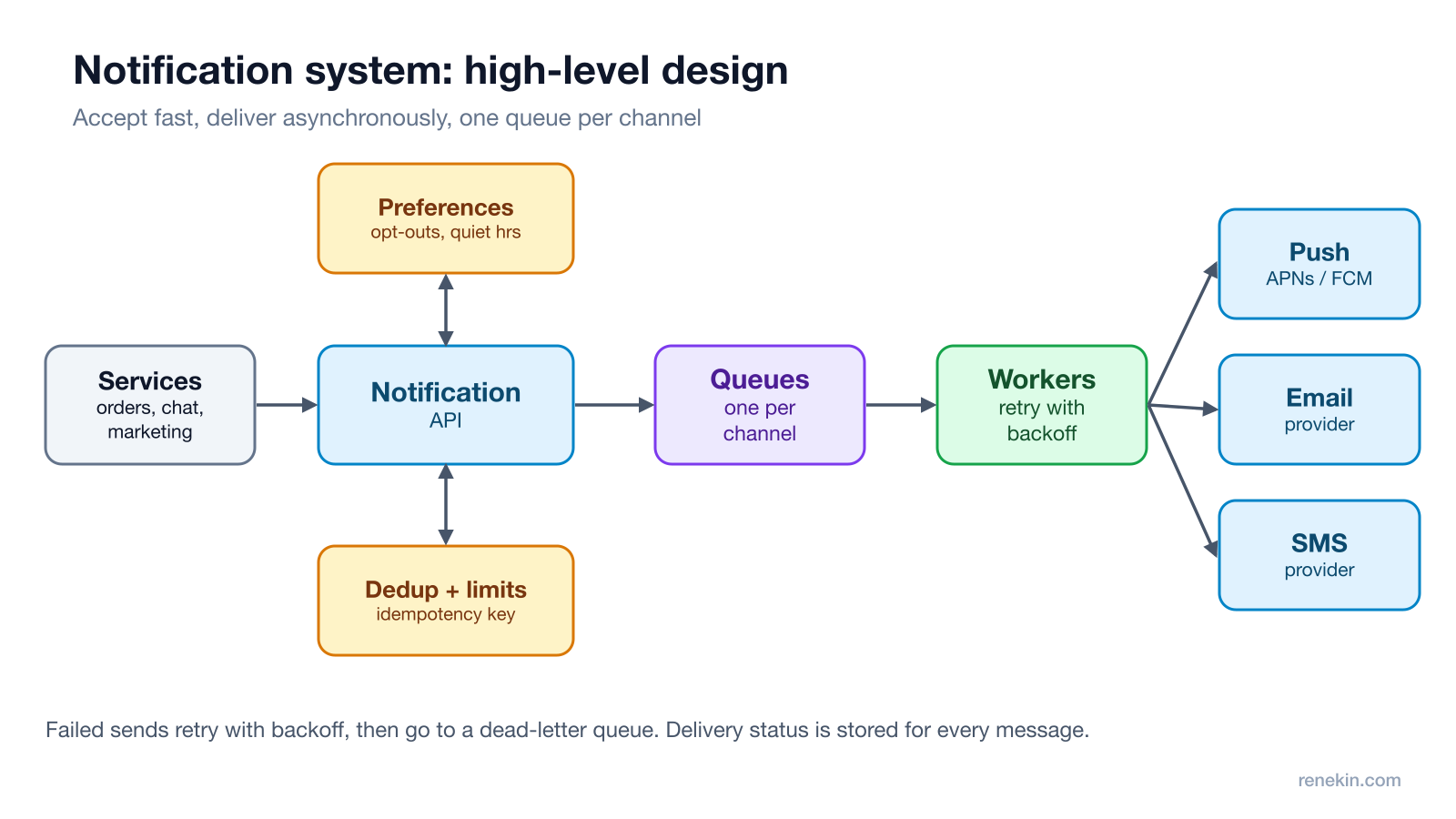
- Services (orders, delivery, marketing) call the notification API with the user ID, the notification type and the data.
- The API checks preferences, applies deduplication and rate limits, renders the template, and writes a record.
- It puts one message per channel on a queue for that channel.
- Workers read from the queues and call the providers: APNs for iOS, FCM for Android, an email service and an SMS gateway.
- The result (sent, failed, bounced) is stored, and provider callbacks update it later (delivered, opened).
Why a queue per channel? Each provider has its own speed limits and failure modes. If the SMS provider is down, push and email keep flowing.
Step 3: Make it reliable
- Retries with backoff: retry temporary failures (timeouts, 5xx, "too many requests") with exponential backoff and jitter. Don't retry permanent failures such as an invalid email or an unregistered device token. (See the Microsoft 365 outage and retry storms.)
- Dead-letter queue: messages that still fail after a few attempts go there, so they can be inspected without blocking the queue.
- Fallbacks: for critical messages such as OTPs, fall back to a second SMS provider or another channel.
- Device tokens: remove push tokens that providers report as no longer valid, so you stop wasting sends.
Step 4: Prevent duplicates and spam
- Idempotency keys: each request carries a key, for example
order_123:shipped:user_9:push. If the same key arrives twice (a retried event, a double click), the second one is ignored. (See idempotency keys explained.) - At-least-once delivery: queues can deliver a message twice. The worker checks the message's status before sending and marks it as sent, so a retry after a crash doesn't send a second copy.
- Rate limits per user: cap how many notifications one user gets per hour or day, especially for marketing, and merge similar ones ("3 items in your cart are on sale"). (See rate limiter system design.)
- Preferences and quiet hours: check opt-outs per category and channel, and hold non-urgent messages until morning in the user's time zone.
Step 5: Separate priorities
Put transactional and marketing messages on separate queues (or give them priorities) with separate workers. A campaign to 5 million users must never delay an OTP. Under heavy load, slow down or pause marketing first.
For big campaigns, don't call the API 5 million times from one place: a campaign service expands the audience in batches, checks preferences in bulk, and feeds the queues at a controlled rate that stays within provider limits.
Step 6: Track and scale
- Delivery log: store each message with its status (queued, sent, delivered, failed, opened) for support questions and analytics. This table grows fast, so partition it by date and expire old rows.
- Scale: the API is stateless, queues absorb spikes, and you add workers per channel as volume grows. The usual limit is the providers' rate limits, so workers must respect them.
- Templates: store them with versions and languages, so content changes don't need a deploy.
The one-line answer
"Services call a notification API that checks preferences, removes duplicates with idempotency keys and renders templates, then queues one message per channel. Workers send through APNs, FCM, email and SMS providers with retries, backoff and a dead-letter queue. Transactional and marketing traffic are kept separate, users are rate limited, and every message's status is stored."
Follow-up questions to expect
- "How do you make sure an OTP arrives within seconds?" A separate high-priority queue and workers, a fast provider with a fallback, short retry intervals and alerts on delivery time.
- "What if a user has three devices?" Store all active device tokens per user and send to each; remove tokens that the provider rejects.
- "Which queue would you use?" Any durable queue works. Kafka suits very high volume and replay; SQS or RabbitMQ are simpler for per-message retries and delays. See Kafka vs RabbitMQ vs SQS.
Frequently asked questions
How does a notification system work?
Other services call a notification API with the user, the event and the data. The service checks the user's preferences, removes duplicates, renders the template and puts the message on a queue for each channel. Workers take messages off the queues and send them through push, email or SMS providers, retrying failures and recording the result.
Why use a queue in a notification system?
Sending through external providers is slow and sometimes fails. A queue lets the API respond immediately, absorbs spikes such as a big marketing send, lets each channel scale separately, and keeps messages safe until they're delivered or moved to a dead-letter queue.
How do you avoid sending duplicate notifications?
Give each notification an idempotency key, such as the event ID plus the user and channel, and record it when the message is accepted. If the same key arrives again, skip it. Workers should also record a message as sent before acknowledging it, so a retry after a crash doesn't send it twice.
How do you handle notification preferences?
Store per-user settings for each channel and category (for example, marketing email off, order updates on), plus quiet hours and time zone. Check them before queuing, and always honour legal opt-outs for marketing.
Try Ghost free
20 free credits, every feature unlocked, hidden from screen share. No card, no subscription.
Download Ghost