Semantic caching for LLM apps: how it works and when it's safe (AI engineer interview)
TL;DR
- A semantic cache embeds each question, searches for a similar past question, and returns its stored answer if the similarity is above a threshold.
- The threshold is the key trade-off: too low and users get answers to a different question; too high and you rarely hit the cache.
- Scope the cache by user or tenant, expire entries when the source data changes, and never cache personal or time-sensitive answers across users.
Many LLM apps answer the same questions again and again in different words. A semantic cache stores past answers and reuses them when a new question means the same thing, saving cost and returning answers in milliseconds.
The interview prompt: "Half our support questions are the same 50 questions phrased differently. Can we stop paying the LLM to answer them every time?"
Try the free Interview Question Predictor
Paste a job description, get the 10 questions you're most likely to be asked, with answer tips. No sign-up.
Step 1: Show why a normal cache isn't enough
A normal cache matches exact keys. "How do I reset my password?", "forgot password help" and "can't log in, need new password" are three different keys, so all three miss. You need to match by meaning, which is what embeddings give you.
Step 2: Walk through the flow
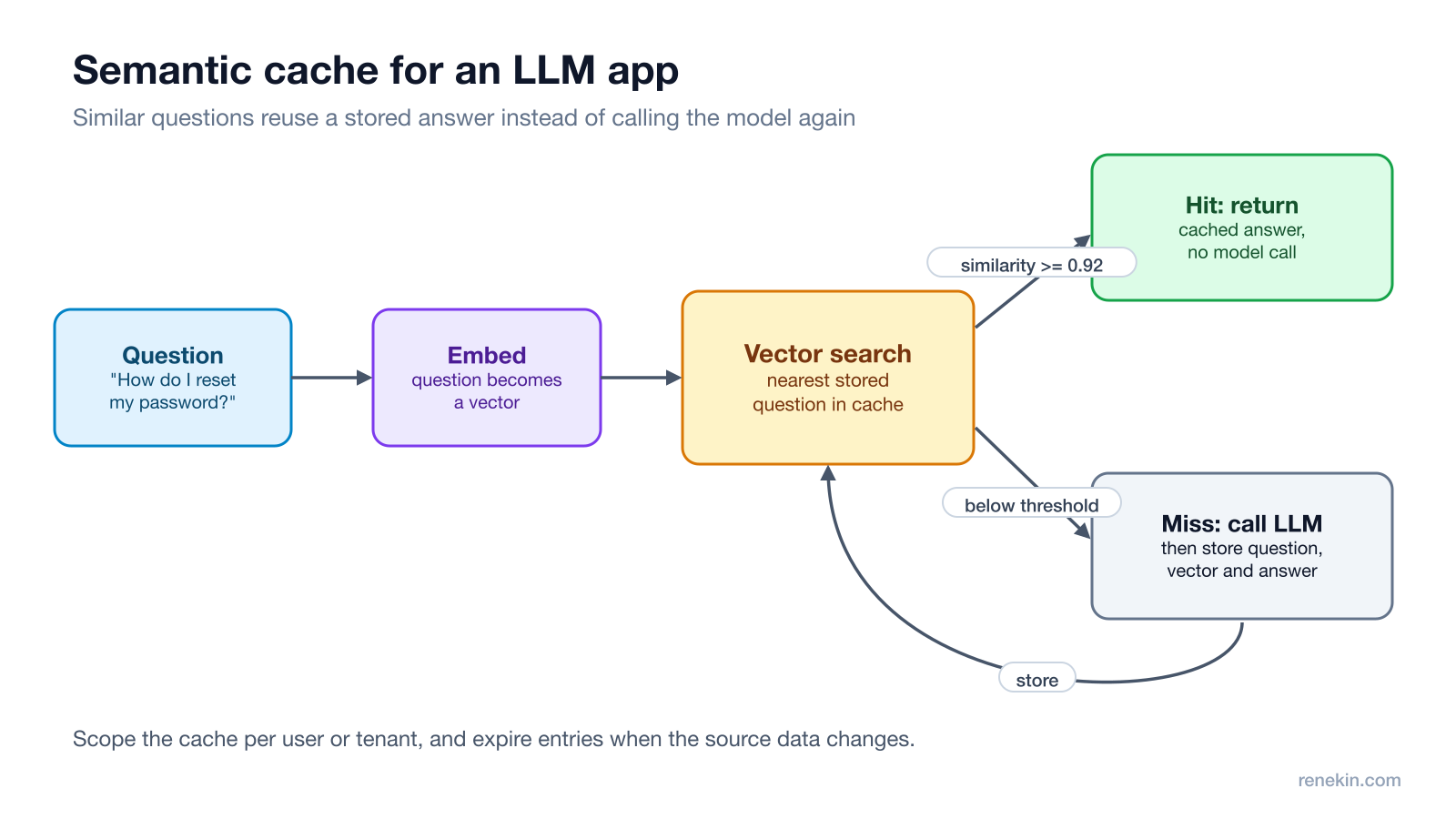
- Normalise the question: trim, lowercase, strip greetings.
- Embed it into a vector with an embedding model.
- Search a vector index (Redis, pgvector or a vector database) for the nearest stored question.
- If the similarity is above the threshold, return the stored answer.
- Otherwise call the LLM, return the answer, and store the question, its vector and the answer.
Open-source projects such as GPTCache implement this pattern, and it's useful to name one.
Step 3: Pick the threshold carefully
The similarity threshold is the whole game:
- Too low: "How do I cancel my order?" matches "How do I cancel my subscription?" and the user gets the wrong answer, confidently.
- Too high: almost nothing matches and you've added latency for little saving.
How to choose it:
- Build a labelled set of question pairs: ones that should share an answer and near-misses that shouldn't.
- Measure the false hit rate at several thresholds and pick one where wrong answers are acceptably rare.
- Re-test whenever you change the embedding model, since similarity scores shift.
Step 4: Decide what's safe to cache
| Safe to cache | Don't cache across users |
|---|---|
| How-to and policy questions | Anything using the user's own data ("where is my order?") |
| Product facts that change rarely | Prices, stock, dates and other live data |
| Definitions and explanations | Answers that depend on earlier messages in the chat |
- Scope keys by tenant, language and user when the answer depends on them.
- Expire entries with a TTL, and clear related entries when the source content, like a help article, is updated.
- Cache only good answers: skip ones users rated badly or that failed validation.
Step 5: Measure whether it's worth it
Track the hit rate, false hit rate (sample hits and have someone check them), cost saved and latency. If only a small share of questions repeat, the embedding call and vector search may cost more than they save. For other ways to cut cost, see reducing LLM latency and cost.
The one-line answer
"I'd embed each normalised question, look up the nearest stored question in a vector index, and return its answer above a similarity threshold tuned on labelled pairs. I'd scope entries per tenant and user where needed, never cache personal or live data, expire entries when sources change, and track hit rate and wrong-hit rate."
Follow-up questions to expect
- "What about multi-turn chats?" Usually cache only the first question, or include a summary of the context in the key.
- "Semantic cache vs prompt caching?" Prompt caching reuses the model's processing of an identical prompt prefix but still generates a new answer. A semantic cache skips the model entirely.
- "How do you stop the cache serving stale answers?" TTLs, invalidation when source documents change, and versioned keys when you change the prompt or model.
Related: debugging a RAG system and caching strategies for system design.
Frequently asked questions
What is a semantic cache?
A semantic cache stores past LLM questions and answers with their embeddings. When a new question arrives, it finds the most similar stored question using vector search, and if the similarity is high enough, returns the stored answer instead of calling the model.
How is a semantic cache different from a normal cache?
A normal cache only matches identical keys, so "reset my password" and "how do I change my password?" are different entries. A semantic cache matches by meaning, so both can hit the same stored answer.
How do you choose the similarity threshold?
Use a labelled set of question pairs that should and shouldn't share an answer, measure the false hit rate at different thresholds, and pick the lowest threshold that keeps wrong answers acceptably rare. Re-check it when you change the embedding model.
When should you not use a semantic cache?
Avoid it for answers that depend on the user's own data, on the current time or prices, or on long conversation context, and for high-stakes answers where a slightly wrong match is unacceptable.
Try Ghost free
20 free credits, every feature unlocked, hidden from screen share. No card, no subscription.
Download Ghost