AI agent interview questions: tools, planning, memory and evals (with answers)
TL;DR
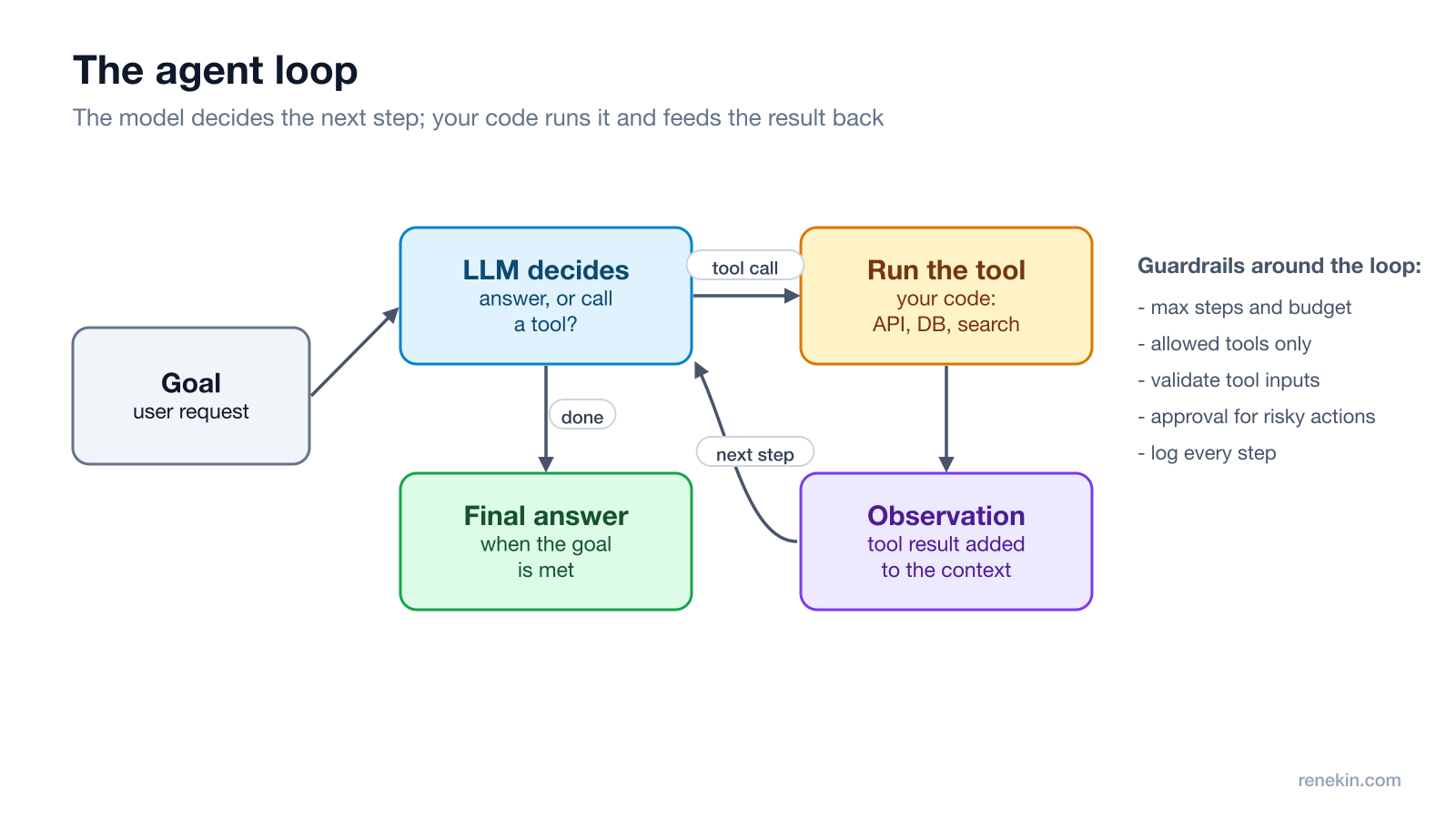
- An agent is an LLM in a loop: it decides the next step, your code runs the tool it chose, the result goes back into the context, and the loop repeats until the goal is met or a limit is hit.
- Interviewers focus on tool design, planning, memory, guardrails (step limits, permissions, approvals) and above all how you evaluate and debug agents.
- Good answers are practical: start with the simplest design that works (often a fixed workflow, not an agent), add autonomy only where it pays off, and measure task success, cost and latency.
AI agents went from demo to job requirement fast. If you're interviewing for an AI engineer or backend role that touches LLMs, expect at least a few questions on agents: how they work, how you'd build one safely, and how you'd know if it works.
Here are the questions that come up most, grouped by topic, with short answers. Say them in your own words and add an example from something you've built.
Try the free Interview Question Predictor
Paste a job description, get the 10 questions you're most likely to be asked, with answer tips. No sign-up.
The basics
1. What is an AI agent?
An LLM in a loop that decides its own next step. It reads the goal and context, chooses an action (usually a tool call), your code runs that action, the result is added to the context, and the model decides again. It stops when it has an answer or hits a limit.
2. Agent vs workflow: when would you not use an agent?
In a workflow, you define the steps ("classify the ticket, retrieve docs, draft a reply"). In an agent, the model picks the steps. Strong answer: "I start with a workflow whenever the steps are known. It's cheaper, faster and easier to test. I use an agent only where the path really can't be predicted, like debugging or open-ended research."
3. What is ReAct?
A pattern where the model alternates reasoning ("I need the order status first") and acting (a tool call), then reads the observation before the next step. Most agent frameworks are built on this idea, though modern models do the reasoning internally and you mostly see the tool calls.
Tools
4. How does tool calling work?
You describe each tool with a name, a description and a JSON schema for its inputs. The model returns a structured request like get_order(order_id="A123"). Your code validates it, runs it, and sends the result back. The model never executes anything itself. We go deeper in LLM tool calling and agent design.
5. What makes a good tool?
- Clear name and description, written for the model: what it does, when to use it, what it returns.
- Few, well-typed parameters, with enums where possible.
- Small, useful outputs. Return the 5 fields that matter, not a 2,000-line JSON dump.
- Helpful errors. "Order not found. Check the ID format: A followed by 3 digits" lets the model recover.
- One job per tool. Ten overlapping tools confuse the model.
6. What is MCP?
The Model Context Protocol: an open standard for connecting AI apps to tools and data. A tool provider builds an MCP server once, and any compatible client can use it. In an interview, mention it as the way to avoid writing custom integrations for every tool.
Planning and control
7. How does an agent plan?
Options from simple to complex: let the model decide one step at a time (ReAct); ask it to write a plan first, then execute steps and revise the plan when something fails; or split work across sub-agents for independent parts. More planning helps long tasks but costs tokens and time.
8. How do you stop an agent from running forever?
Hard limits in your code, not just in the prompt: a maximum number of steps, a token or cost budget, a wall-clock timeout, and detection of repeated identical tool calls. When a limit is hit, return what you have and say what's missing.
9. When would you use multiple agents?
When the work splits into independent parts that benefit from separate context, such as researching five companies in parallel, or when roles really differ (a writer and a reviewer). Multi-agent systems cost more and are harder to debug, so it's a choice to justify, not a default.
Memory
10. What kinds of memory does an agent have?
- Short-term: the conversation and tool results in the current context window.
- Long-term: facts saved outside the model (a database or vector store) and retrieved when relevant, like user preferences or past decisions.
- Working notes: a scratchpad or task list the agent updates during a long task.
11. What do you do when the context gets too long?
Summarise older steps, drop tool outputs once they've been used, keep only the fields that matter, and store full results outside the context with a reference the agent can fetch if needed. Our post on LLM chatbot memory covers these techniques.
Safety and guardrails
12. How do you make an agent safe?
- Least privilege: only the tools and permissions the task needs; read-only where possible.
- Validate every tool input in code, as you would user input.
- Human approval for anything irreversible: payments, emails, deletions, production changes.
- Treat tool outputs as untrusted. A web page or email can contain instructions aimed at the model. See prompt injection in AI agents.
- Log everything, so you can see what happened and why.
13. What is prompt injection, and why is it worse for agents?
Text from outside (a document, web page or email) that tries to give the model new instructions. With a chatbot the damage is a bad answer. With an agent that can send emails or call APIs, it can become a bad action. Defences: separate trusted instructions from untrusted data, limit tool permissions, require approval for sensitive actions, and filter what goes in and out.
Evaluation and debugging
14. How do you evaluate an agent?
Build a task set: 50 to 200 realistic tasks with known good outcomes. For each run, measure:
- Task success rate (did it actually achieve the goal?)
- Steps and tool errors per task
- Cost and latency per task
- Safety violations (tried a forbidden action, leaked data)
Rerun the set on every prompt, model or tool change. Our LLM evals post shows how to wire this into CI.
15. An agent works in the demo but fails in production. How do you debug it?
Pull the full traces of failed runs: every prompt, tool call and result. Look for patterns: the wrong tool chosen, bad arguments, a tool returning too much data, the model giving up early, or looping. Fix the most common cause first (often tool descriptions or tool outputs, not the main prompt), add those cases to the eval set, and rerun.
Cost and performance
16. How do you reduce an agent's cost and latency?
Fewer steps (better tools, a clear plan), smaller models for simple steps, prompt caching for the stable system prompt and tool definitions, running independent tool calls in parallel, and trimming tool outputs. Also check whether a fixed workflow would do the job. See how to reduce LLM latency and cost.
A system design question to practise
"Design an agent that handles customer refund requests."
A good outline: a workflow first (classify the request, fetch the order, check the refund policy), with the model deciding only the judgement calls. Tools for order lookup and policy checks are read-only. The refund action is a separate tool that requires human approval above a set amount. Every decision is logged. Evaluate on past tickets with known correct outcomes, and track refund accuracy, escalation rate and cost per ticket.
That answer shows the three things interviewers look for: restraint (not everything needs autonomy), safety, and measurement.
Frequently asked questions
What is an AI agent?
An AI agent is a system where a language model decides which actions to take, such as calling tools or APIs, looks at the results, and keeps going until it reaches a goal. Unlike a fixed chain, the sequence of steps isn't decided in advance by the developer.
What is the difference between an agent and a workflow?
In a workflow, the developer defines the steps and the LLM fills in parts of them. In an agent, the LLM chooses the steps itself. Workflows are more predictable, cheaper and easier to test; agents handle open-ended tasks where the steps can't be known in advance.
How do you evaluate an AI agent?
Build a set of realistic tasks with known good outcomes, then measure task success rate, number of steps, tool errors, cost and latency per task. Also review full traces of failures to see where the agent went wrong, and rerun the set on every prompt, model or tool change.
What is MCP?
The Model Context Protocol is an open standard for connecting AI applications to tools and data sources. A tool provider writes an MCP server once, and any MCP-compatible client can use its tools without custom integration code.
Try Ghost free
20 free credits, every feature unlocked, hidden from screen share. No card, no subscription.
Download Ghost